Use USB for Marshmallow1.2
Publisher Description
*** THIS APP IS FOR ROOTED PHONES ***
*** THIS APP IS THE XPOSED MODULE ****
*** THIS APP IS FOR MARSHMALLOW PHONES ***
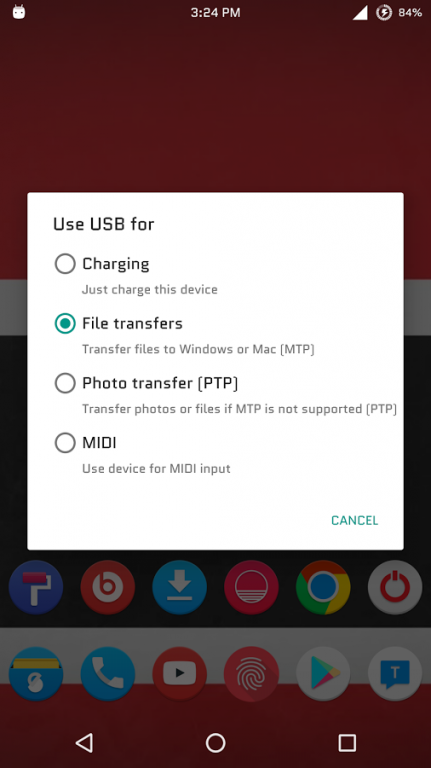
Set MTP or PTP as Default USB Connection on Marshmallow with this app.
There is no settings for this app, Just enable this app in the Xposed Installer and Reboot.
Once you connect the phone to the computer and select the USB option from the notification and selected option will be retained for every reconnect your phone to computer.
For example if you select the USB file transfer option, This app will retain that file transfer option for every reconnect your phone to computer.
Install Instructions
★Install Xposed Installer
★Install Xposed Framework
★Install this app
★Activate the module in Xposed Installer app
★Reboot the phone
★Connect your phone to computer via USB
★Select the USB option from the notification
#mtp enable #usb file trasnfer
About Use USB for Marshmallow
The company that develops Use USB for Marshmallow is Riyajudeen Mohamed yousuf. The latest version released by its developer is 1.2.
To install Use USB for Marshmallow on your Android device, just click the green Continue To App button above to start the installation process. The app is listed on our website since 2015-12-22 and was downloaded 38 times. We have already checked if the download link is safe, however for your own protection we recommend that you scan the downloaded app with your antivirus. Your antivirus may detect the Use USB for Marshmallow as malware as malware if the download link to rayyan.black.fem.ind.runner is broken.
How to install Use USB for Marshmallow on your Android device:
- Click on the Continue To App button on our website. This will redirect you to Google Play.
- Once the Use USB for Marshmallow is shown in the Google Play listing of your Android device, you can start its download and installation. Tap on the Install button located below the search bar and to the right of the app icon.
- A pop-up window with the permissions required by Use USB for Marshmallow will be shown. Click on Accept to continue the process.
- Use USB for Marshmallow will be downloaded onto your device, displaying a progress. Once the download completes, the installation will start and you'll get a notification after the installation is finished.
Program Details
System requirements
Download information
Pricing
Version History
version 1.2
posted on 2015-12-22
V 1.2
Improved the security for this module(mount the storage after the phone is unlocked with pattern or pin or password)
V 1.1
Compatible with Nexus 7 2013
CM Roms
